|
Atari ST was launched in 1985. As next generation (for that time) home/business computer, with GUI (graphical user interface), mouse as standard equipment, floppy drive, hard disk support in HW and OS. Atari ST's OS is called TOS, and consists from 2 main parts: GEMDOS - responsible for boot, HW, disk/file handling. And GEM - graphical environment manager , + Desktop as part of it, where most common tasks can be performed. Main HW specs: CPU: Motorola MC68000 at 8 MHz clock rate. Min RAM 512 KB, max RAM supported by regular HW: 4 MB . ROM: 192 KB for TOS 1.00-1.04 - ST, Mega ST, Stacy . 256 KB for 1.06 and later - STE, Mega STE. Very early STs were with only 16 KB boot ROM, what loads TOS from floppy (or some SW what can work without TOS). Video: 3 modes: Low res. 320x200 px, any can have one of 16 colors from palette, and any palette entry can have one of 512 color nuances, so color 'resolution' is 9 bits - 3-3-3 for R,G,B . Medium res. 640x200 px, any can have one of 4 colors - for palette stays same as above. High res. 640x400 px, any can be white or black. In all 3 modes screen takes exactly 32000 bytes RAM, what can be in any RAM area. And unlike at many computers video generation (reading from screen RAM) does not slow down CPU (RAM has enough bandwith for both) - very nice feature. Displays what can be used: In 20-th Century it was: TVs, some color monitors - for color modes (low, medium res.) SM124 by Atari for monochrome mode. Little later VGA monitors appeared, and they could be used too with proper cable in most cases. In 21-st Century for color modes can use flat panel TVs, best if there is Scart input for best quality. VGA monitors - 99% good for high res, some are good for color modes (MultiSync and like) . And now there are available diverse converters for latest TVs/monitors with HDMI or VGA . Although price of such thing is comparable with price of new TV of monitor size. Video output connectors: Atari ST specific Din 13 pin connector: the are: R,G,B, sync signals for best color quality, then mono audio, monohrome (high res) output, mono sensor, +12V (good for Scart RGB mode switching) , and composite video (NTSC or PAL). Early models had no composite video, and no RF output too. 520STM is what has composite and RF - M means modulator. Or 520 STFM (with integrated floppy drive - at 1987) . More about what monitors and how lower. Storage: 3.5 inch floppy drive is standard equipment. Usual disk capacities: 360 KB, 400 KB, 720 KB, 800 KB. Less used is 880KB (hyperformat - slower, less reliable). So, DD (double density) disks. HD is not supported by ST, STE, only by Mega STE and TT, Falcon. But it is possible with little HW add-on, and DMA chip will work well with it. And with something much faster: Hard disks, mass storage HW support in ST for: main component is DMA (direct memory access) chip. It can 2 Mbytes/sec in peak - and this is well tested by me on diverse models, including TT. Here need to say that in Atari DOCs, ProfiBuch ... can see lower speeds, and they are just wrong. Well, they did not have enough fast hard disks in those early years, nor enough fast adapters. DMA is connected to ACSI port - that 19 pin connector on back side. It used early SCSI protocol, called SASI - max accessible capacity is 1 GB, limited set of commands. Of course 8-bit data bus there. To attach some SCSI drive there adapter is required. Best adapters were developed and manufactured by ICD, and they are who created ICD protocol for ACSI extension - more than 1 GB accessible, full SCSI-1 command set. And it became practically standard - used too with modern Flash card adapters like UltraSatan, GifaFile ... There is standard parallel port for printers (LPT), serial port on backside. STE has stereo RCA audio outputs too. And at left side is carridge port,, intended to attach there ROM of max 128 KB size. Mostly for diagnostic/service purpose. But independent developers designed diverse adapters there - like video digitizer, LAN/USB ... adapter, IDE hard disk adapter ... Wanna run games from cartridge instead floppy (like on Atari XL) ? There were no games published that way - floppy disk is cheaper and bigger capacity. But it is possible, on my (this) site there are instructions and some (mostly shorter size) games adapter for. And last but not least: MIDI connectors - that was especially useful for musicians, and many of them choosed Atari ST because it. Well supported by diverse SW. GEMDOS: Atari's disk operating system is very similar to DOS, what is no wonder, since is developed by Digital Research. So, floppies are using FAT12 filesystem, what was standard already in that time. And Atari/DR made it pretty much flexible - unlike DOS and Windows, format is not rigid, so it will work well with 800 KB floppies, 400 KB (single side) and even 880 KB or little more. In Desktop there is floppy format option, but it can produce only 360 or 720 KB formats. And only at TOS 1.04 it is really DOS compatible (earlier versions had wrong start bytes). What today (2019++) is relevant is that work with floppies is everything but not easy. Mostly because disks and drives are very old, so it is unreliable. Considering access of Atari floppy disks on some PC: that was problem already some 15 years ago, mostly because Windows inflexible floppy driver. And now there are no floppy drives in PCs, and no floppy connector at all, so you can not connect it to newer PC internally. Only way is USB floppy drive, if there are such still in shops. But that way is very limited. Such drives will not work with formats like 800 KB. Some will work with only 1.44 MB format, so pretty much useless. TOS version: there is plenty of SW, what will show version of TOS in your Atari. For instance my game adaptations for hard disk, at start. But you can see it pretty well by clicking on Desk, Desktop Info. If year is 1985 it is TOS 1.00 . 1987 - 1.02 . 1989 - 1.04 . Hard disks, mass storage with Atari ST family, file system: There is FAT16 support in TOS, what is just another standard filesystem type. And it is DOS compatible, but only up to 32 MB partition size. Well, such partitions are compatible, but not MBR (master boot record) too - so, DOS, Windows, MAC will not be able to access hard disks, or now rather Flash cards with Atari type (AHDI) partitions. The solution is to use DOS type MBR, and there is nothing bad in it, since TOS self doesn't deal with MBR, that's on hard disk driver SW. + TOS/DOS compatible partitions - and they can be of max size of 512 MB on TOS 1.04 and higher. With 1.00-1.02 max size is 256 MB. Max total count of partitions what TOS can handle is 14. Multiple drives/cards on Atari ST: TOS and hard disk driver will mount partitions in order: first all partitions from first one - like C-G. Then partitions from second one, so first one on it will be H: , then following ones. Up to P: (14th) . TOS/DOS compatible partitioning means very easy data transfer with some modern computer, especially in case of Flash cards. Hierarchical system, or layers, some standards in mass storage: Too access some file, it's content, what is seemingly very simple task several oomponents are involved - as HW components, and as well SW components (layers). On HW side it means that data stored on specific area of disk needs to be transferred in RAM area specified for it. Transfer process self consists of: giving parameters (address on disk, size) to drive, via DMA chip, ACSI connector, cable, connector on hard disk to hard disk, where electronic will transfer it to signals for head movement, setting read, then perform read of desired data from given address - with proper command, and read goes first in buffer RAM of hard disk. Only when whole sectors (which standard size is 512 bytes) are readen complete in buffer of driver will be transferred to computer - again via connectors, cable, DMA chip - finally to RAM of computer. It can happen in several sessions in case of large data segment. For instance DMA chip can transfer max 255 sectors, so about 128 KB in one 'session' - then must again give parameters. etc. To be able to work with different brand and type disks there are standards. And here is most interesting, and maybe hardest to understand part: there are no hard disks self (only drive, without case & electronic) what can directly attach to ACSI port. Or in other words there are no ACSI hard disks. You can attach some usual, avialable hard disk to Atari ST ACSI connector only via adapter, what is complexer digital electronic which transfers ACSI commands, parameters to SCSI for instance. What Atari made in beginning with Gigafile was conversion to MFM/RLL type hard disks. Now we have SD card based UltraSatan and similar, where ACSI is converted to protocol used by such cards, and it is very similar to SCSI, plus need parallel serial conversion in both directions. Just to add that there were plans to make adapters for ACSI port for IDE hard disks, some 15 years ago, but both were dropped, can say for sure that reason was complexity of it. + spreading of SD cards on market, and lower prices of them. I managed to design special converter/adapter for Compact Flash cards for ACSI port, but it works only with Sandisk ones, because only they support 8-bit DMA mode (and ACSI is 8-bit, as is stated already here). And transfer happens in IDE DMA mode, what is basically same as SCSI type handshaking transfer, what is same by ACSI too. Differences are mostly in giving commands, parameters. SW side of mass storage: this is where we have so called layers. Top layer is filesystem in OS (TOS in our case). It is responsible to convert user or SW requests for some file based on it's name and path to addresses of sectors on hard disk (Flash card rather now) . And again standard: FAT16 is used in TOS, better said big FAT16 . File allocation table is FAT, 16 is number of bits which are used for addressing (here will not go in more details about, who wants it may find lof of it online). Shortly: 2 POW 16 is addressible sector count with FAT16 (not big one). That's now 'only' 32 MB for 1 partition. And actually, it was not enough in 1985 already. That's why big FAT16 was invented. 16 bits for record remained, but record could be of multiple physical (512 bytes) sectors. With regular FAT16 it is called cluster. Atari went on little different solution with large logical sectors, and that's the reason for incompatibility with now still standard DOS FAT16, and need for DOS/TOS compatible partitions on Atari mass storage. Some may say, why Atari should care then to be DOS compatible ? Well, the truth is that they did care: and it is compatible until 32 MB partition size, and they even use low Endian (Intel) byte order in TOS filesystem (same is with floppies and FAT12) . But from some reasons (most likely C compiler limitations) in case of larger partitions it failed. Back to layers: next one is hard disk driver. This is what gets addresses inside partition, converts to absolute address, and then gives it as parameter to port - important ! It gives it not directly to hard disk, but to port, and it is of course ACSI port. Adapter there is what gives parameters and commands to drive self - and that might be something different - just little - ACSI-SCSI case, or more different - ACSI-SD card. Or very different - ACSI-IDE (no such adapter made so far) . ACSI-CF adapter is something between, and it uses not standard protocol. Then, we have chain of adapters in some cases: like ACSI-SCSI - SCSI-SD . But it is practically equal with ACSI-SD. As I see, some people don't understand that SW what should work with it must be with communication with ACSI port. You can not use regular SCSI or IDE protocol via DMA chip (and it goes via it always). Adapter is what will convert it to attached drives protocol. So, in case of Atari ST and ACSI port attached drives we have one standard protocol, I call it Basic ACSI - and it it is good for max 1 GB accessing (can attach larger drives, but only first 1 GB will be accessible) . That was good in years before about 1995. So, ICD designed special protocol for more, and for SCSI commands with more parameters (10 instead 6 bytes of them with command) . That became standard too. TOS does not need to support it because loading master boot sector (MBR) can do with Basic ACSI (at begin of disk). Hard disk driver must support it, of course. And this is practically all what was/is widely used with Atari ST . There is no special SCSI driver SW for Atari ST, STE, it exists only for TT and Falcon, which have own SCSI port and controller. There are some special adapters for ACSI, and they normally can not AUTOboot without extra code in TOS. Still, they work via DMA chip. So, next layer is ACSI-target drive adapter. And yes, there may be some kind of SW in them too (firmware). More complex conversion is needed. Some CPLD or like is used in many of them. But hard disk driver on Atari will work by protocol at left side of their description - ACSI . There is some SW in drives self, but really no need to go into it. Summary: filesystem in OS, often referred as DOS (disk operating system) is what communicates with user, SW. DOS communicates with hard disk driver SW, and it communicates with ACSI port, what can be attached in case of ACSI port only to some kind of adapter, not directly to SCSI disk or SD card. Yes, what UltraSatan has in self is basically ACSI-SD adapter. What mass storage in 2019 ? Indeed some Flash card based one. Most popular is UltraSatan - it uses SD cards, speed is good, and is well supported. With IDE adapter can use CF cards, which are now little harder to find, are more expensive. In any case is recommended to use brand cards, from reliable source. There is lot of crap on market. Cheaper can be just useless. GEM(AES), Desktop: Windows, icons, mouse, pull down menus (WIPM) - that's is key of it. Usage is really not hard, and can get familiar in short time. Actually, there is no so big diff. between it and some new OS. Of course, there is much less to learn :-) YouTube video of ST Tour from 1986 - for very beginners: ST Tour , 6 minutes Image of floppy: Explorer Pack B - can run with real Atari, or in emulator. Limited choice of features can be expanded with so called Desktop Accessories. They are special programs with extension ACC, and will load automatically from bood drive after power on, reset or resolution change. For instance CONTROL.ACC serves for time setting/read. Setting colors, mouse speed ... Accessories are nice thing, but they eat RAM and may slowdown computer, so use them when it is really needed. Bad practice is to install 'everything available' . If there is some program with extension PRG in folder in ROOT named AUTO, it will be executed after GEMDOS initialisation, and before GEM start. It is used mostly with games - and most of them doesn't need GEM, so will have more RAM available. AUTO start is used too, to install some resident SW like diverse drivers, extensions, fonts, etc. Same stays as for accessories - do not install everything, just what really need. Why it starts not, why need to wait about minute that Desktop appear ? It needs formatted floppy in drive. One of most frequent questions is: why I don't see hard disk partitions D, E ... on Desktop ? TOS 1.xx will put only partition (logical drive) C: icon on Desktop if it is mounted by hard disk driver. Others need to add there 'by hand' Icon for C: will not appear too, if Desktop is saved without it. Select one of drives (A, B, C ...), then Options, Install Disk Drive. Type in drive letter (capital) and may give label by wish. Of course Install to finish it . 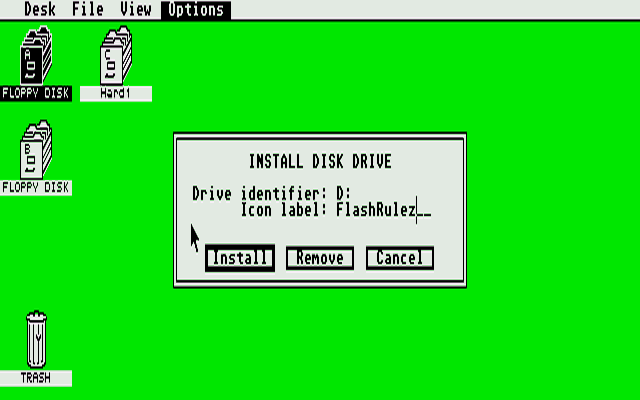 To save self from doing it every time again, use Save Desktop option. Options, Save Desktop. That will save current resolution too, so you may start in medium resolution without need to change. What display is good for Atari ST(E) ? This can be now serious problem. We are more than 33 years after release of Atari ST on market. In meantime TV standards changed - went digital, as lot of it, of course. Old monitors, TVs work not anymore, or if work may cost a lot - for instance shipping of some working original Atari monitor may cost near as new flat panel TV ! Atari ST has 3 different possible video outputs, and 3 video modes, considering vertical frequency: 1: Monochrome mode - vertical refresh rate is 71 Hz, and that's very good for longer time spent in front of monitor. Atari made special monitor for it. Was not expensive - because it is B/W . Luckily, that mode still works on most of new computer monitors - via VGA input. Just needs proper cable. Resolution is 640x400 px . 2 'colors' . There is special pin for this output, + sync, sensor lines. 2. PAL color mode. Vertical refresh rate is 50 Hz, resolution can be low or medium 320x200 16 colors, or 640x200 4 colors. 3. NTSC color mode. Vertical refresh rate is 60 Hz. Same res. as above . Color modes can be used: via RF modulator (if there is such in machine) - then can attach to TV via antenna input. Indeed lowest quality, but must say here that best among TV outputs of personal computers I seen. TV channel is something around VHF 2. Via composite output - it goes together with RF modulator. Better pic, separated sound output. Via RGB lines: best, because no color encoding, so is cleaner, sharper. And You can use 50 or 60 Hz modes without losing colors on same monitor, and if lucky on same TV - if it has RGB input (Scart usually) and supports both refresh rates. Now, supporting of old video signals on new monitors, TVs is not present on all them. Especially not in NTSC regions, where Scart connector is not common too. But there are even LCD computer monitors where Atari color modes work via VGA connector. There are lists of them online, in forums. Solution in 2019: if you don't have suitable monitor, TV: 1. Getting converter, what converts Atari video out to new standards - HDMI in first place. But VGA is good too (yet). Of course, this is for case when having some newer monitor, TV with HDMI and/or VGA input. That can be not so easy, since there is lot of it in offer, mostly online, and there are risks of low quality. While prices are pretty much high. Look in Atari forums for more. 2. If have no monitor, TV, or it is very old, then can just get new LCD TV with Scart input. Prices are low, so it can cost not more than some better RGB-HDMI converter. Range is around 100-140 Euros for 22-24 inch size. 3. Using original Atari or other CRT monitor from those years. It has it's benefits, especially in case of some very video related demos, if you want that 'classic feeling'. But I would not invest much in it - 30 year old electronic will not last long, and repairing it may be not simple and cheap too. Changing video mode in middle of work: That is possible only in certain cases. Changing from color to mone mode: that needs reset of Atari ST(E). Because of different refresh rates, and because only reset and what follows it will initiate new mode properly. And reset will happen if you connect different monitor in middle of work (what is btw. not recommended - switch it off first). That's safety measure, to prevent damage of old, CRT monitors - some overvoltage can happen with wrong scan frequencies. Changing from low res to medium or vs. : that is possible even in middle of some running SW. But if that SW using VDI, AES function, mouse, that will work not well. When you change res. , video mode from Desktop, then may see that can not select mono if in color mode, or vs. Can switch to low from medium or vs. And then, it will reload Desktop.inf , even ACCessories - that's because then VDI and AES is reinitialised for new resolution. And for the end of this longer section: 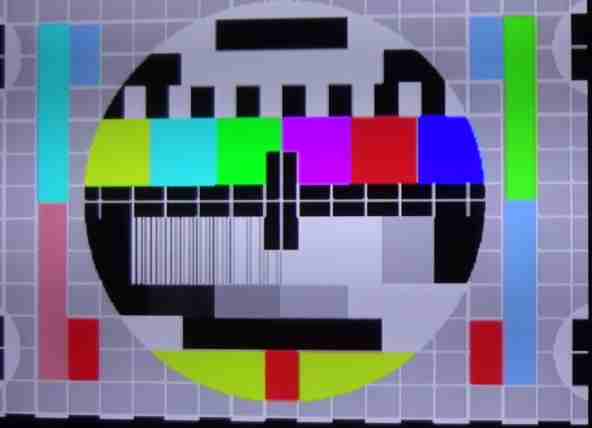 This is common problem when connecting to some newer flat panel TV via RGB lines. Too bright, bad grey scale. 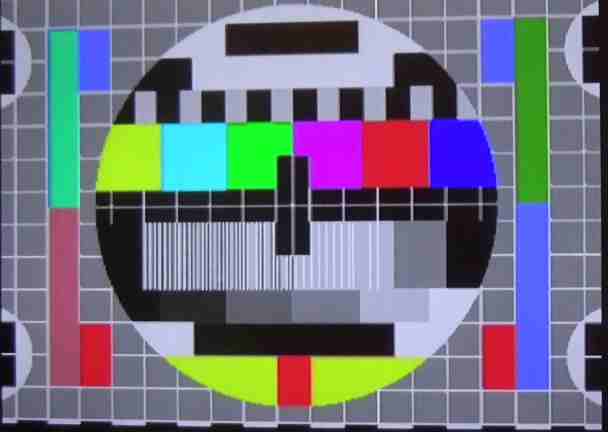 Fixed above problem by adding serial resistors in RGB lines, in cable. The reason for problem is overdrive - too high amplitude of video signals of Atari ST. Note: if some wrong colors bothering you - that's because this is reduced to 16 colors. Why picture is so high ? This is so called overscan - larger res than standard, achieved by special tricks. This test pattern is in res 320x240 px . Now TV test pattern is part of improved TOS. Atari ST SW compatibility: Will focus here mostly on games. This is very complex problem, and to judge reliably why some SW, game works not with certain configuration is really hard, and needs lot of experience. Most common cause of problem(s): TOS version . Espacially early games, from 1985-87 can have problems on later TOS versions. Like joystick or mouse works not (properly) . Here need to write little about TOS versions: 1.00 - there is even disk based version of it, so only small part is in ROM, most loads. Pretty much useless, and hard to find such - most is upgraded long time ago. 1.00 is really not recommended, especially with hard disks. There are few games which work only with it, but you can find updated/fixed version of them for higher TOS versions. For Atari ST TOS 1.04 is recommended. For STE 1.62 (bugfixed 1.06). There is TOS 2.06, with much better Desktop, and worse compatibility, especially with games. Still, can play a lot, almost all, since quality games are fixed for. But you can not just put TOS 2.06 EPROMs in some ST - it needs little + HW that it work. Some games will fail on STE, and common cause is TOS version, but there are few with silly bugs (STE is very compatible in HW with ST) - and they are fixed for STE. Probably most stupid cause is bad code in games considering RAM size in machine: some will crash with 1MB or more, and work only with 512 K. Some will crash with 4MB RAM . The reason is lack of testing - RAM was very expensive in those early years, so even SW developers had no machines with lot of RAM . Most of it is fixed. Some will not work because regional restrictions - game (SW) code will check for TOS language/region version, and if don't like it, to say so - like region is USA, and SW is intended for Europe, it will simply not work. Usually will write nothing on screen. Because it stays in manual, and pirate copies have no manual :-) Running Atari ST(E) games from hard disk: Another complex problem. In short: most of it will not work from hard disk without changes, fixes, and that is work for expert. Only small count of games has option to install on hard disk, and even then may need original floppy to check is it original or pirate copy. Or just whole hard disk install is obsolete now. In 2019 we can say that basically all quality games are already adapted for work from hard disk. Will add here some useful links ... PP, May 2019 - March 2021. |