|
Why dealing with very old Atari ST TOS in 2018++ ? Simple answer is that
there are things which could be done better. Especially work with hard
disks. And since in this years floppy drives and disks become more and
more problem, unreliable, while Flash card storage becomes cheaper and
cheaper, it is normal that people replaces floppy drives with mass
storage.
Main improvements: better work with hard disks, real FAT16 filesystem. What is in TOS 1.00-4.xx is rather FAT15, and is not compatible with widely used DOS FAT16, despite using Low Endian byte order . So, that's corrected. iTOS can work with partitions of size up to 1 GB, and 30 of them. TOS 1.04 -4.02 can work with max 14 partitions of max size of 512 MB. In case of 1.00 and 1.02 max size is 256 MB. And iTOS does it with even less RAM and faster. 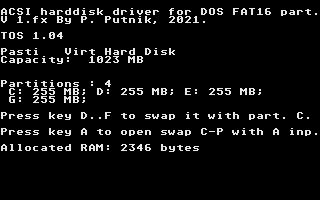 Look at Allocated RAM value on pic above - normally it is around 40-100 KB. Virtual Floppy: possible work with floppy image files instead floppy disks and drive. This is much better than Floppy Image Runner (my SW, btw.) . And there are some new possibilites, like very large image files, so can put content of multiple floppies in single image file. Latest update: easy change of logical drive (partitions) letter on Desktop, so no need to put there plenty of drive icons: As may see Desktop allows max 25 drive icons. While iTOS supports up to 30 hard disk partitions. 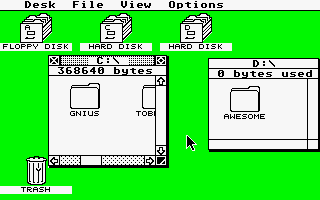 3 Desktop drive icons can be enough for comfortable work with lot of partitions. Need something with drive F: ? 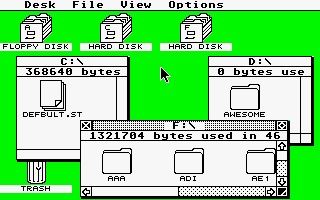 After placing mouse cursor over D: , hold down key F and left click . It became F: and can open that drive/partition window to access content. This feature is now present in 1.04i and 1.62i . (Aug. 2022) . Little more details near bottom. Other features will be described below. What TOS versions are improved ? TOS 1.04 - latest TOS for ST, Mega ST machines. TOS 1.62 - STE TOS, in big part same as TOS 1.04 - no wonder, both are from 1989. Since TOS consists from 2 pretty much independent parts - GEMDOS, what initialises HW, works with disks and peripherals, and AES/Desktop, called GEM too - that's part which works with windows, dialogs, so basically GUI . And it is possible to combine GEMDOS from one TOS v. with AES from other TOS v. TOS 2.06 offers self to use it's AES part - much better Desktop, while it's GEMDOS part is not so compatible with older SW, especially games. So, there are yet: TOS 2.14 - combo of 1.04i GEMDOS and 2.06 AES/Desktop - for ST machines. TOS 2.16 - combo of 1.04i GEMDOS and 2.06 AES/Desktop - for STE machines. But I can deliver 2.16 for Mega STE too - there is some extra code for init it's extra HW. Despite lot of it added, better disk FAT16 filesystem, all it fits in regular TOS ROM space - thanx to used optimizations of code, some packing used. And is highly compatible with original TOS 1.04 or 1.62 . RAM layout is same, system vatiables are on same addresses. Can boot regular hard disk drivers for diverse adapters in usual way. AHDI (TOS) type medias, partitions will work fine - new FAT16 handles all it well too. But is recommended to use more efficient DOS type partitions (easy to create with integrated partitioner or special PRG for that) , integrated driver, or special driver for this, what handles up to 30 partitions up to 1 GB . Look that low RAM usage of such driver in YT above. Other improvements, features: Virtual Floppy and Raw Image system This could be most useful feature, especially for people with broken floppy drives, bad floppy disks. Of course, only for owners of some mass storage. Now Flash card based ones are most popular. Since everything is stored on mass storage, it doesn't need extra RAM. Virtual floppy can be of very large size - like 30 MB, so can place there content of many floppies. Gaming support: it can run even games, basically what works with Floppy Image Runner, will work with this too. However, here is support for image changes 'on fly', and Raw Image Access feature, what makes possible running even those hard disk adapted games, but with only 512KB in machine, saves from games can work too . And all it even faster. Detailed manual for Virtual Floppy usage Some games already adapted with RIA system Some useful info after reset - TOS version, boot stage : TOS version will be shown (like 1.04i), then countdown starts (normally at 9 secs) . During it can activate diverse changes, run some special SW from TOS ROM self, and like. 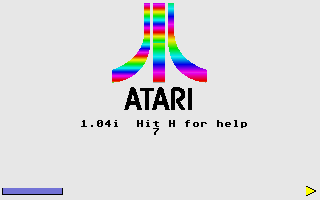 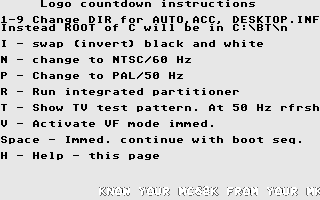 Keys - will write here as capitals, but it works with simple key press in lower case mode. Space: immediate continuing - aborts countdown and starts boot seq. P - change to PAL video mode, refresh rate will be 50 Hz. Of course only in color modes N - change to NTSCvideo mode, refresh rate will be 60 Hz. Of course only in color modes I - swap (invert) black and white colors 1-9 - purpose is quick and simple environment change, something like boot managers. Instead default A:/, A:/AUTO or same on C: AUTO run PRGs, ACC-essories, DESKTOP.INF will load and save to special DIRs on A:/BT (not much sense) or C:/BT/1-9 . No need for special subdir AUTO there, just copy PRGs for AUTO run in numbered subDIR. like C:/BT/3 . So, user can make some configurations for specific usage, tasks, and simple enter that mode, without need to bother with boot manager settings. T - show TV test pattern - good for checking/setting picture position, size, test proper contrast, brightness ... Exit test pic. with space key. Note: it is with some overscan. 320x240 px . 16 colors. 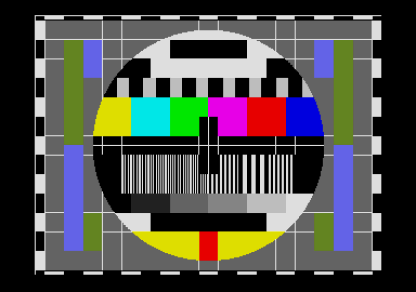 R - run integrated partitioner 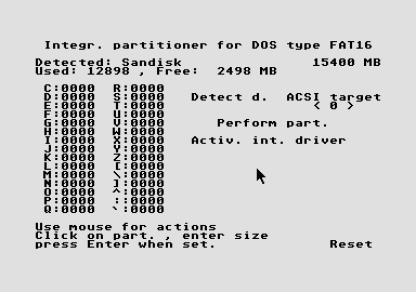 V - activate Virtual Floppy mode immediately - will activate by last setting, if there is such . Holding down right shift key will prevent AUTO run - that need to do later, after floppy, hard disk boot . Messages appearing - like "Floppy boot", "Hard disk boot", "Integrated driver", "Auto run" does not mean that it really executes, because that depends from disk content. Purpose is to see in which stage of boot seq. computer is. 2022 Aug: special Desktop feature added: It is normal now to have plenty of partitions on modern storage, with now cheap high capacity. Regular TOS supports max 16 logical drives, including A and B . So, up to P, ant that's 14 partitions. In low res so many drive icons will fill practically complete Desktop. And iTOS supports max 30 partitions - that will fill it in medium res, in low res not possible to show so many. And in normal usage people does not access all partitions, just few, in one session. So, I came on idea that changing drive icons drive letter somehow would be pretty useful. Holding down desired drive letter (A-P or even more - to Z and [,\,], `) and clicking drive icon (selecting it) will change drive letter to desired one. Can advance or lower letter by holding down + or - on NumPad . Above YT video demonstrates it better than words. And that means that no need for icons for all logical drives on Desktop. I guess that 3-8 will fit all needs, situations. TOS v. shown in Desktop Info (instead useless 'all rights ...') 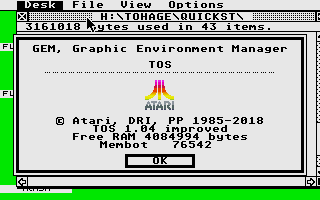 Membot shows start address of RAM free for user programs. It can be much higher than indicated if there is many of resident SW installed, large hard disk driver buffer, and like. And that might be not good for some SW, what is coded to run only in lower space. 1.04i and 1.62i . More details: More screenshots, some videos, prices, HW hints .. Manual PP, Jan 2018.- July 2022. |